
From zero to your first regular viewers
Every streamer you watch today started with zero viewers. Every single one. The good news is that the stuff that gets you your first regulars is free, it doesn't care how big your budget is, and you can start on it tonight.
The quick version
- Become a regular in two or three streams your size, in their chat and their Discords.
- Raid out at the end of every stream, so you and your community land in front of new eyes.
- Clip your best moments and post them as short vertical videos.
- Stream with friends when you can, pick a category where page one is within reach, use your tags, and keep a schedule.
- When someone shows up, say hi by name and keep talking.
- Skip follow-for-follow, lurk-for-lurk and promo channels.
It's slow, and nobody can promise you a number. Every piece of it is free, though, and each one has its own section below. You've got this.
So you've been streaming for a while, and there's no one watching. It's the lay of the land, unfortunately, and there's no global pandemic keeping people home to watch your stream while they're supposed to "work." So it's normal and has nothing to do with you. Browse can sort channels by viewer count, but rarely does anyone look for the least viewers anymore. They're looking for the middle ground, or the most popular. And no one who isn't following you will get a ping that you went live (could you imagine the spam?).
Twitch's own analytics estimates your spot in browse from your average viewers over the last 30 days, so at zero you start at the bottom. You didn't miss a setting and nothing's broken on your end (there's no secret button). So you bring them in yourself.
Make friends with streamers your size
Your first viewers come from people. Twitch even says to network: "Spend time in streams you genuinely enjoy and get to know other broadcasters." Twitch's CEO has called collaborations one of the best ways to grow. Easier said than done. In real life that's slow and pretty specific. You pick a few streamers your size that you like. You should be up in their chat for weeks as a regular, you chat on their streams, you chat in their Discord, and maybe, just maybe, your channel comes up when they come up.
Start small, with two or three channels. Show up often enough that they know your name, talk about what's on their stream instead of yours, and let your channel come up when someone asks. That works the same on Kick and YouTube, since it's just being a good regular somewhere.
Nobody has measured how well this converts, and we looked. What it has going for it is that Twitch, the people who've done it and every guide we read all land on the same thing, which is as solid as advice gets without numbers.
Network without spamming
And it depends on who you're actually showing up to. It could be genuine networking or just spam. Chatting with people who already know you is networking, and dropping your link in a room full of strangers is spam, or self-promotion, which usually leads to a timeout, or worse, a ban. Then there are Discord servers with promo channels. Barely anyone reads those, everyone else is already posting like crazy in there, and your link gets buried. Even the guides that recommend them don't have real numbers. Then you have follow-for-follow, support-for-support, or lurk-for-lurk, which are a bust, because at best you get hollow follows (people who follow but never show up, and still expect you to be in their streams). Twitch's rules name F4F and L4L as fake engagement, and S4S is the same thing wearing a different hat.
The line we use: networking happens with people who know your name before they see your link, and spam goes to rooms, like a go-live channel, a promo thread or a stranger's chat. Every etiquette rule you've read (take part first, promote second, let it come up naturally) is a version of that one idea.
Raid out every stream
So what do you do? It can't be all doom and gloom, right? Right. Raid out when your stream ends. It's free, and it puts your name in front of a streamer you'd like to know, which is exactly how Twitch pitches raids in the first place. Your community lands in front of new eyes, the other streamer and their chat meet you, and people follow back. That last part is Turk's experience from streaming since the Justin.tv days, and it's why raiding out is in this plan every single stream.
To make a raid count, pick someone around your size whose stream you'd watch anyway, tell your chat who it is and why before you send them, and raid while your viewers are still around. When someone raids you, thank them by name (Twitch's own Creator Camp says so) and give them a shoutout. On Twitch, /shoutout puts a follow button for that channel right in your chat, and you and your mods can both use it.
Other platforms? Kick's raid (host) button wakes up once you have 5 viewers, so it's a tool for a little later. YouTube calls it Live Redirect, and it needs over 1,000 subscribers plus the other channel's permission.
The hard numbers on raids are thin. They also measure the other direction. One case study shows most raiders drifting off within minutes, and one published story counts one or two follows from a raid of five hundred, for the channel that got raided. Nobody has measured what raiding out does for the raider, or whether people raid you back. But what else are you going to do? Buy viewers? (No.)
Raids got smaller in March 2026
Most raid advice was written before Chrome 145, and two changes since then matter a lot. Here's the nerd explanation.
Since Chrome 145 (March 2026), Chrome pauses the video in a background tab when the player is muted, and Twitch is one of the sites it names. Click back to the tab and the video starts again, and muting the tab itself (with the player left alone) never triggers it.
Then there's counting. A view only counts while the video plays, and just having the page open doesn't do it. Twitch's video stack documentation adds a view within 15 seconds of playback starting and takes it away within a minute of playback stopping.
Put those two together. A lurker who muted the player and switched tabs has been paused, and uncounted, ever since March 2026. When a raid carries that tab over to your channel, it shows up still muted and still in the background, and it stays paused until that person clicks back in.
So raids move fewer counted viewers than they used to. People who come back to their tab later do still land on your channel, because a raid follows the chat connection ("A raid sends everyone connected to chat"). It just doesn't drag the video along with it.
Twitch hasn't published a counting rule of its own, and the claim that muting doesn't take you out of the count only shows up on SEO sites. Lurking in someone else's stream? Mute the tab and leave the player's sound up, and you'll keep counting for them.
Clip your best moments
Short videos are how a lot of people find a live channel from outside Twitch. Twitch's own clip editor turns a clip vertical (game and camera stacked, or just one), puts your username on it, and shares it to YouTube Shorts, so a good moment from tonight can go somewhere strangers scroll. Twitch also says its mobile app feed is open to everyone ("all live streams and clips are automatically eligible"), though they don't give out the specifics for tiny channels.
Clip the funny, the clutch and the weird, keep them short, and post a few a week. Nobody publishes how many viewers a clip turns into, so this one rests on how discovery works, and there's no measured number behind it.
Stream with other people
Twitch's Stream Together lets you go live alongside other streamers, and Shared Chat merges your chats so both communities can talk to each other. It's open to everyone, and everyone in it has to be live. Better still, when you collab with Shared Chat on (sharing audio or video and answering chat), Twitch shows the combined count of unique viewers across all of you on its discovery pages, where it can move you up when people sort by viewers. Twitch built that so collaborating wouldn't cost anyone their numbers.
Two small streamers who like each other's streams are the perfect pair. Pick a game you both play, set a date, and tell both chats about it ahead of time. On Kick and YouTube there's no Shared Chat, but going live together and sending people to each other still introduces your communities.
Pick a category where you can be seen
Picking a smaller category is the strongest visibility lever you control. A smaller category is a shorter list, so the bottom of it sits a lot closer to the top. Before you settle on one, look it up on a Twitch stats site like SullyGnome, which shows how many channels stream a category and how many people watch it. You want somewhere with people watching but not so many channels that you're on page twenty. Then stream something you'd play anyway, because you have to enjoy it for this to last.
That advice rests on one source that shows its work, plus how browse sorting is documented to behave, so treat any specific numbers as one voice.
Use your tags and title
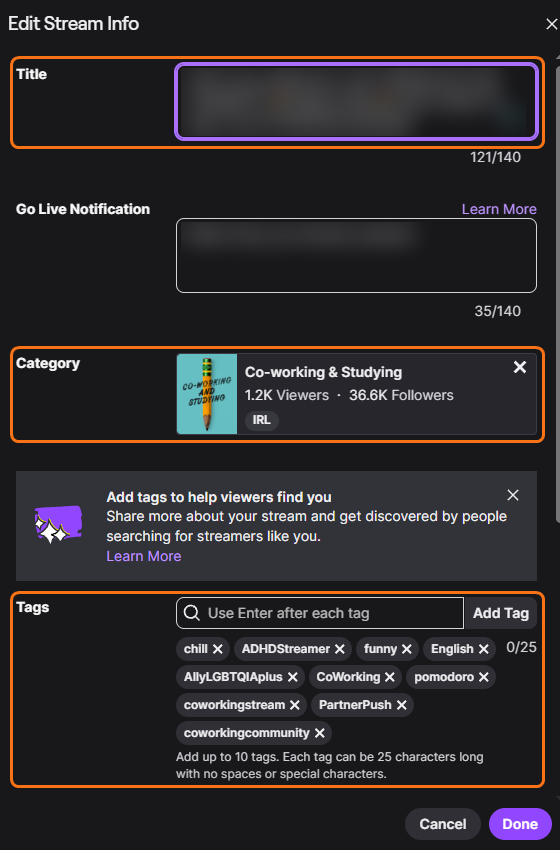
Twitch lets you add up to ten tags, in your own words. When someone searches a tag, channels using it show up at the top of the results, and Twitch's own advice is to try different combinations and see which ones bring people in. Use tags for what makes your stream yours on top of the game: your language, your vibe, the thing you're doing tonight. Your title, category and thumbnail are everything a stranger browsing sees, so make the title say what's happening right now.
Make the first ones stay
When someone shows up, say hi by name. Keep talking even if they don't answer. Twitch's Creator Camp says not to pressure lurkers into chatting, so a quick hello and a comfy stream beat a spotlight. Keep narrating what you're doing like there's a full room, because whoever drops in next lands in the middle of it. (More on that in what to do with the first minute.)
Keep a schedule
A schedule won't get you found. Twitch's recommendations page lists what it uses, and schedules aren't on it. What a schedule does is help the people who already liked you come back, and Creator Camp's Attract pillar includes sharing one. Post it on your channel and in your Discord, and stick to it.
How STB helps
STB has tools for most of this, all free.
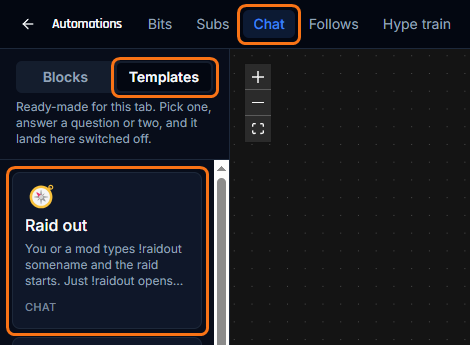
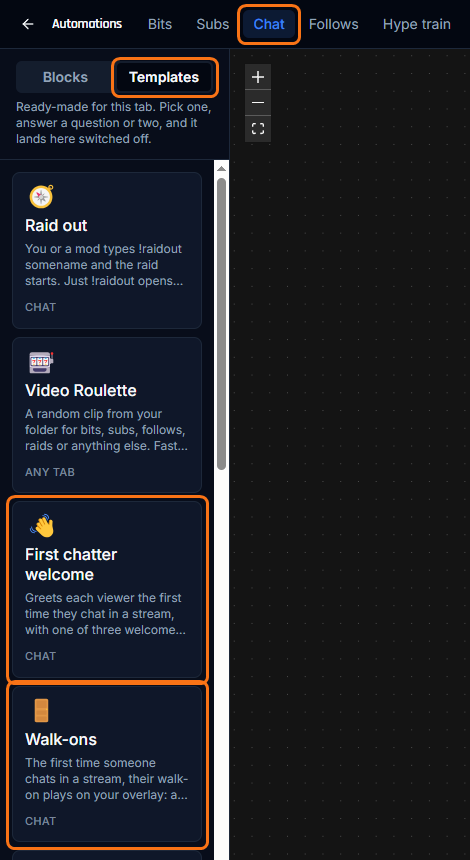
The raid picker. Add the Raid out template (Automations, the Chat tab, then Templates) and switch it on. Then !raidout opens a picker of who you could raid: friends who are live, smaller channels in your category, and other STB streamers who share your chatters. Pick one and the raid starts. The picker lives in OBS as a browser dock, added once with the link on the template's "Show the raid picker" block. (Friends live needs you to reconnect Twitch once.)
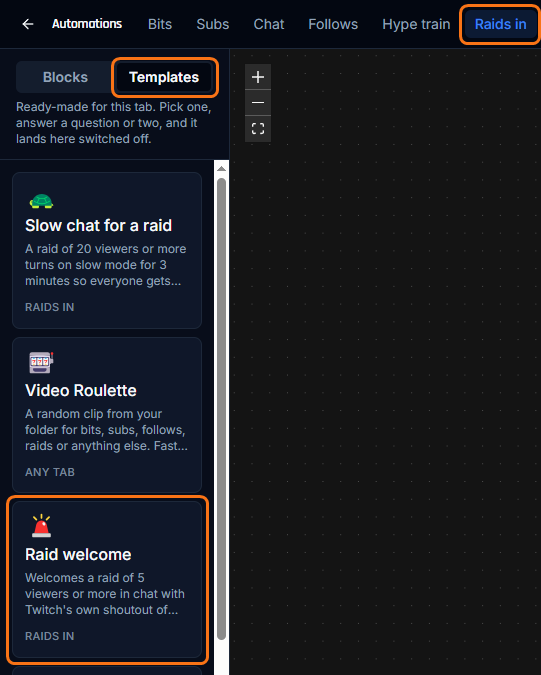
Raid welcome. An automation template that welcomes a raid of 5 or more, gives the raider Twitch's own shoutout, and can play a clip from a folder you pick. You'll find it on the Raids in tab, under Templates.
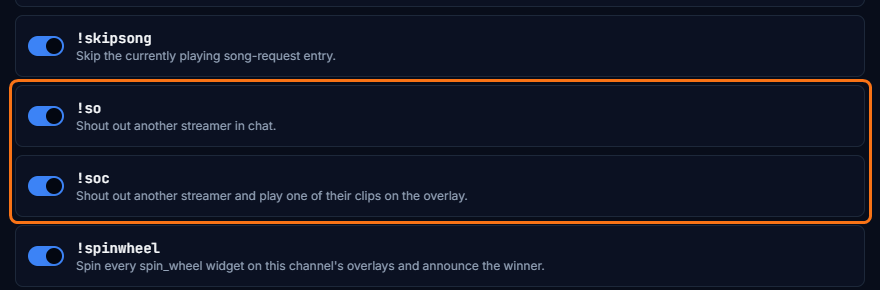
!so and !soc. Built-in commands for you and your mods: shout someone out in chat, or do it and play one of their clips on your overlay. They're already on. You'll find them in Chatbot, then Responses, then Commands, under Global Commands.
First chatter welcome and walk-ons. A template that greets each viewer's first message of the stream, and walk-ons that play someone's own clip, GIF or sound the first time they chat. Both are templates on the Chat tab.
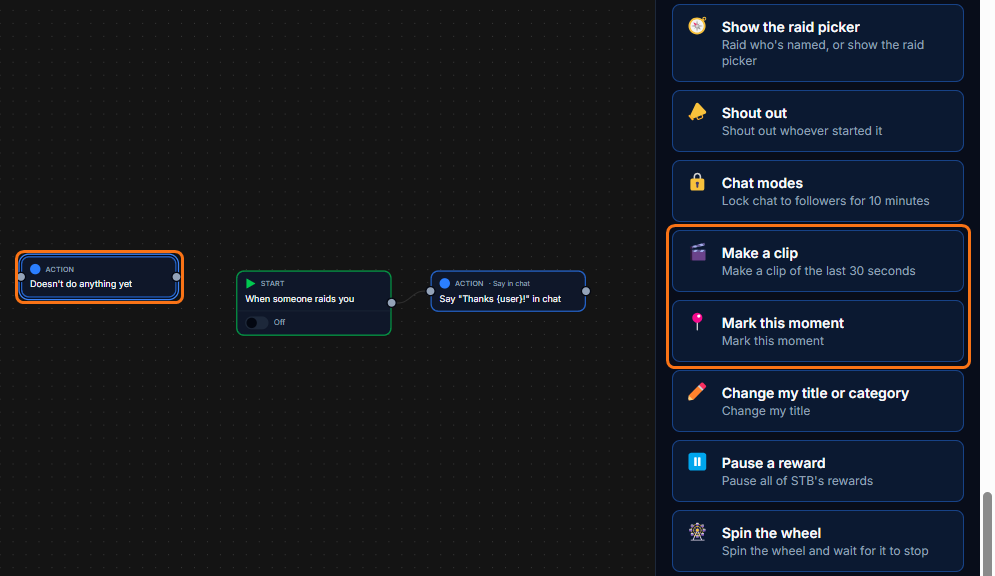
Clips and markers from automations. An automation can make a clip and post its link, or mark a moment for your VOD, so the good stuff is waiting when you sit down to cut shorts. Add an Action block to any automation and pick Make a clip or Mark this moment.
Discord go-live announcements from the STB Discord bot, so your people know the second you start.
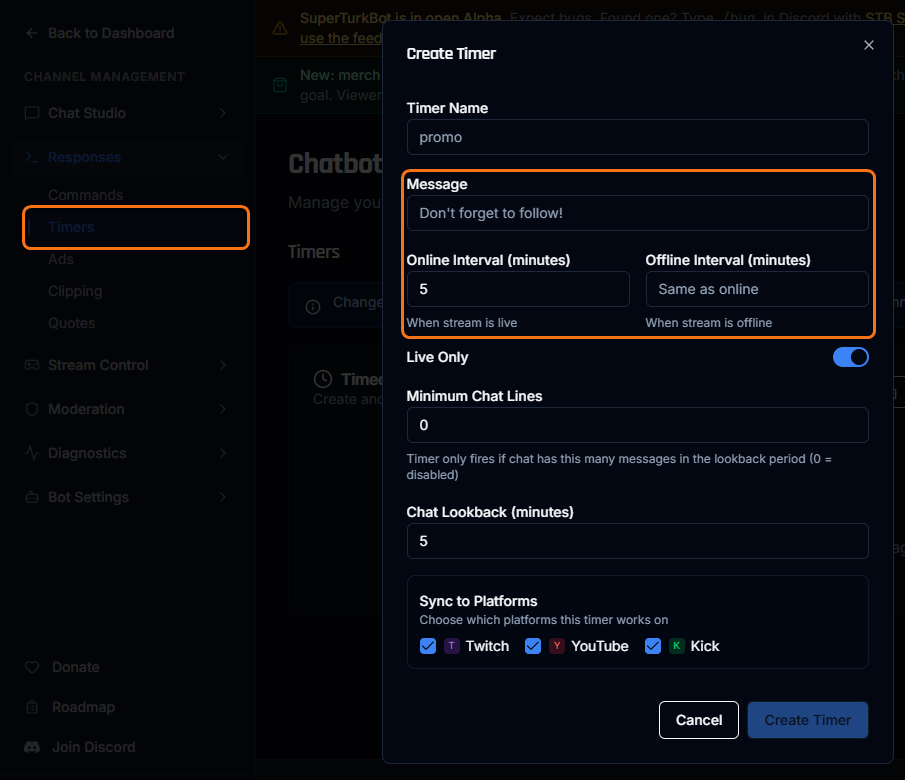
Timers, to post your schedule and socials while you stream, in Chatbot, then Responses, then Timers.
Where this comes from
The platform rules and features here come from Twitch's own pages: the recommendations page, Creator Camp, the raid page, the fake engagement policy, the video stack's counting documentation, and Twitch's posts on tags, Shared Chat, Shared Viewership and the clip editor. The Kick host rule comes from Kick's help center, and Live Redirect from YouTube's. The Chrome change is in Chrome's release notes, and it was still in place through version 147.
Some parts are ours. The line between networking and spam is our read of the sources. Raiding out as a growth tool is Turk's experience. The idea that a raided player in a muted background tab stays paused is our read of the Chrome change, and nobody has tested raid arrival counts across Chrome versions.
What we looked for and couldn't find
We never found an official Twitch statement on muted viewers and the view count, only SEO sites claiming one exists. Harris Heller's own material is missing too, because his transcripts couldn't be reached in two tries, so we left the best-known voice for growing off-platform out instead of quoting him secondhand.
We dropped the "61 percent of creators under 50 followers" survey, because the site errored out and nobody knows where it came from. Same goes for the "90 percent of channels average under 5 viewers" stat, which gets repeated everywhere with no source anyone can open, so we just say "normal" and skip the number. And nobody anywhere has measured how well networking converts, what raiding out does for the raider, how many viewers a clip brings, or how many people click through from go-live channels. Got real numbers on any of that? We want them!
TL;DR: make friends with streamers your size, raid out every stream, clip your best moments, collab when you can, pick a category where you can be seen, use your tags, and keep a schedule for whoever comes back. Every channel you watch started where you are.
How well supported this is
Several independent sources agreed
a zero-viewer channel is structurally invisible on the browse surface, stated by Twitch's own Est. Browse Position definition and repeated by every guide read
networking with specific same-size streamers is the working path, agreed by Twitch's Creator Camp, the CEO letter, and every community guide read, none of which measure it
generic link-dropping is the least effective move, agreed even by the two sources that recommend promo servers
being raided converts to follows rarely for the channel receiving the raid, agreed by the one measured case, the one published anecdote, and Twitch's own 'with a bit of luck' hedge; none of it measures what raiding out does for the raider
F4F and L4L are fake engagement in written policy, which settles that lane regardless of whether it works
Chrome 145 pausing muted background media is corroborated across the coverage and user threads, and Google has not reversed it through Chrome 147
Stream Together with Shared Chat is open to everyone and counts collaborators' combined unique viewers on discovery surfaces, per two Twitch posts
Twitch's clip editor makes vertical clips and shares them to YouTube Shorts, per Twitch's announcement and the coverage of it
This rests on a single voice
the category-picker case (775 followers in a week) is one channel from one newsletter
the raid decay curve (most raiders gone within minutes) is one 2020 case study
the IVS 15-second and 1-minute counting windows are one AWS document, applied to twitch.tv by inference
raid-back reciprocity as an engine is community belief with no measurement anywhere
that the algorithm rewards schedule consistency is community belief Twitch has never confirmed; no published input mentions schedules
raiding out grows a channel by putting it and its community in front of new eyes, with follows coming back: Turk's experience streaming since the Justin.tv days, unmeasured
short-form clips as the main outside way into a live channel rests on how discovery works; nobody publishes conversion
Sources
Twitch's own growth frame: Attract, Nurture, Network; 'Spend time in streams you genuinely enjoy and get to know other broadcasters'; 'Share a schedule and post when you're live'; official lurker etiquette (do not coerce lurkers into chatting)
What it misses: no numbers and no priority order; a reader cannot tell which pillar does the work at zero
raid mechanics: 'A raid sends everyone connected to chat at the time of the raid to the recipient channel', the opt-out window, no pre-roll on arrival, and Twitch's own hedge that 'with a bit of luck, the raiders will stick around'; we hold a dated snapshot of this page
official framing of raiding as meeting creators and growing connections, plus receiving etiquette (thank the raider by name, introduce yourself briefly)
What it misses: no conversion expectations at all
Kick raid mechanics and the constraint that matters here: 'Your stream must have at least 5 Viewers for the raid button to become active', so the raid-out advice is unavailable exactly at zero on Kick; read while archiving Twitch's rules
the written rule that settles F4F: coordinated exchange 'sometimes identified as Follow 4 Follow (F4F), Lurk 4 Lurk (L4L), or Host 4 Host (H4H)' is fake engagement and 'is not permitted on Twitch services'; we hold a dated snapshot of this page
the published recommendation inputs (device, engagement, language, login state, region, watch history, age) and the browse page sortable 'by the number of viewers or by Twitch's recommendations'; no schedule signal and no channel-side surfacing rule appears anywhere in it; we hold a dated snapshot of this page
the one stated open door: 'All live streams and clips are automatically eligible to appear in the feed if they meet our content guidelines' (the mobile Discovery Feed)
What it misses: eligibility is not surfacing; nothing says how often a zero-viewer channel actually appears
'Est. Browse Position: An estimate of where your stream might show up on the Browse page when sorted from high to low, based on your average viewers from the last 30 days', which is the structural problem stated by Twitch itself; we hold a dated snapshot of this page
'Collaborations are one of the best ways you can grow and reach new audiences', and clips on other platforms as the way new viewers find you, from the CEO
What it misses: strategy letter, no mechanics and no numbers
the playback-based counting rule from Twitch's own video infrastructure sold as AWS IVS: 'a new view appears in viewerCount within 15 seconds of when video playback starts and a view is removed from viewerCount within 1 minute of when video playback ends'
What it misses: IVS documents its product, not twitch.tv; Twitch itself publishes no counting rule, and its displayed counts also pass the 2025 artificial-viewer filtering
Chrome 145 (March 2026) pauses player-muted media when the tab is backgrounded, names Twitch and YouTube as affected, notes playback resumes on returning to the tab, and that tab-level Mute Site is exempt; unacknowledged by Google through Chrome 147
What it misses: does not single Twitch out as most affected and says nothing about viewer counts; the counting consequence is assembled from the IVS rule, not stated here
the one measured raid case: 23 to 1,816 viewers at raid time, most gone within minutes, settling near 60; also evidence that pre-2026 raids moved large counted numbers instantly
What it misses: a single extreme-mismatch raid in 2020; no follow conversion reported
the go-live channel reality from a source recommending them: 'Short live updates, real conversation, and thoughtful participation usually do better than generic promotional posts', and do not treat Discord like an ad channel
What it misses: measures nothing; server member counts are its only numbers
same convergence from a server-list article: 'indiscriminate self-promotion is often the least effective way to build authentic communities', engage before promoting, servers require verification
What it misses: vendor blog (sells overlays); never claims the promo channels deliver viewers, which is itself telling
the category-choice lever with working shown: SullyGnome's game picker, one 27-average-viewer channel gaining 775 followers in a week during a niche-game month, and the author's own caveat that 'by no means is this an exact science'
What it misses: one channel, one month, and the streamer already had 27 average viewers; treated as a mechanism illustration, not a benchmark
the community-guide version of this topic from a Partner: category saturation as the trap, talk as if someone is there, engage arrivals; read in the openings run
What it misses: assumes friends and family are available to seed chat; behaviour claims unmeasured
Shared Viewership: in a Stream Together session with Shared Chat on, Twitch shows the total unique concurrent viewers across every collaborating channel on its discovery surfaces, where it can affect position when sorting by viewers; collaborators have to share audio or video and respond to chat
What it misses: no numbers on how much a combined count moves a small channel
Shared Chat is available to everyone through Stream Together, guests must be live to join, and it was built so collaborating streamers' communities could talk to each other
up to ten custom tags in the streamer's own words; channels using a searched tag are highlighted at the top of the results; Twitch's advice to test tag combinations to attract new viewers
What it misses: 2022; no data on how much a tag lifts a small channel
Twitch's clip editor converts clips to vertical, watermarks the streamer's username, and shares to YouTube Shorts, per Twitch's own announcement
What it misses: 2023 coverage of a launch; no figures on clips bringing viewers to a live channel
Twitch's /shoutout (September 2022): streamers and their mods put a follow prompt for another channel in chat, and the shouted-out streamer is notified
What it misses: launch coverage; cooldowns and current limits not covered
Kick's host button becomes active at 5 viewers and redirects the host's viewers to the chosen live channel
YouTube Live Redirect sends a live stream's viewers to another channel's live stream or Premiere when it ends; it needs over 1,000 subscribers and no strikes, and the receiving channel has to give permission
What it misses: corrects this article's August note that YouTube has no raids
a Twitch statistics service with channel counts and viewer figures per game over set periods, which is what the category check uses
What it misses: a tool, not research; it does not say which categories are good for a small channel
We also read and rejected 2 sources for this article, mostly for unsourced figures or for selling the thing they were assessing.
What we changed
raids are networking and not a way to get viewers, because even big raids convert to a follow or two; YouTube has no raids
raiding out is in the plan as a growth tool (Turk's experience); the thin conversion data measures the channel receiving a raid, not the raider; YouTube's raid is Live Redirect
rewritten as a growth playbook at Turk's direction, with clips, collabs, tags and the category check added from Twitch's own posts, and the raid data's direction stated plainly
everyone connected to a raid arrives as a counted viewer, so a raid moves your whole concurrent count to the target
player-muted streams in backgrounded Chrome tabs pause since Chrome 145, and paused playback stops counting within about a minute, so the counted number a raid lands is smaller than the connected number; the navigation itself still happens for everyone connected to chat
Chrome 145 shipped the muted-background-media suspension in March 2026; the counting consequence combines it with the playback-based view rule in the AWS IVS documentation, and that combination is this run's inference, not a tested measurement
Want this while you stream?
A.N.N.A is the SuperTurkBot assistant. She reads everything on this page and answers questions in your own dashboard, about your own channel, with your numbers in front of her. See SuperTurkBot.