
Being botted by someone else: what is real, and what to do the day it happens
Breathe. You're not getting banned for this, and your channel is going to be fine. If fake viewers or fake follows are pouring in and you didn't buy them, this page is the whole plan for today.
The quick version
- You're not in trouble. Twitch's own rules say it doesn't penalize good-faith streamers for what someone else did.
- Today: don't reply to whoever claims credit, report that account, turn on followers-only or verified-email chat, and pause your follow alerts.
- Using STB? Its follow-bot guard pauses your follow automations during a flood. Add the Chat lockdown template, and any of your mods can type !lockdown for 10 minutes of followers-only chat.
- Your numbers will jump around for a while. That's Twitch filtering the fake ones out, and it looks scarier than it is.
- Then get back to growing, like nothing happened.
You're not getting banned for this
That's the fear, and it's probably why you're reading this at 2am. Twitch has written the answer down twice.
The Community Guidelines say: "We have methods to detect the responsible party and do not penalize good-faith streamers under these circumstances." The botting help article is shorter and has no conditions attached: "Twitch will not punish a user for the actions of another."
We went looking for a single case of a streamer punished for being botted by somebody else, in two separate passes, and found none.
What to do today
- Don't reply to whoever is claiming credit. Don't argue, don't ask them to stop, don't negotiate. Getting a reaction is the whole point for them.
- Report the account that claims responsibility or offers to sell you the service. It's a normal user report, and there's no special form for this.
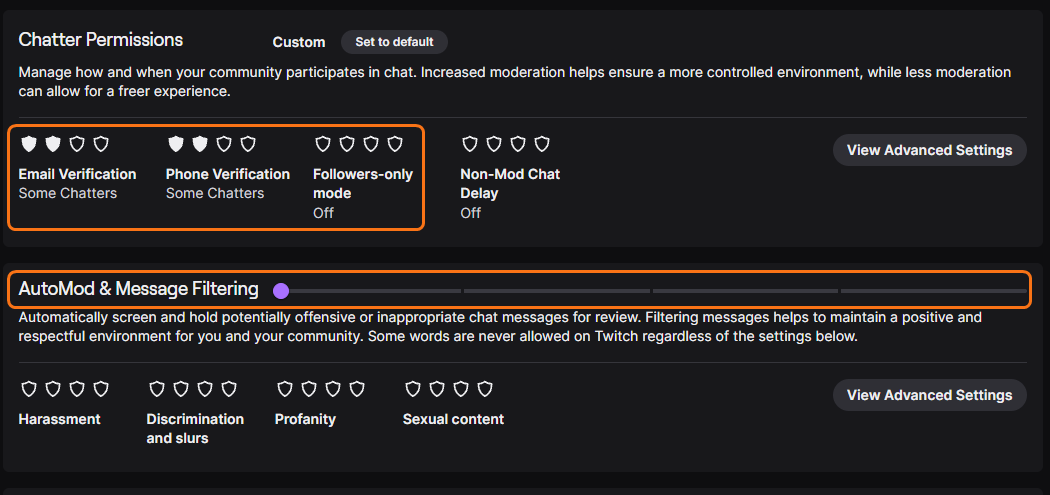
- Turn on followers-only chat, or verified-email chat, and raise AutoMod, if chat is getting hit as well.
- Pause your follow alerts so a wave of fake names doesn't read out on stream.
- Say something in chat, or don't. Either is fine. Twitch's own advice is to report it, stay calm, and skip the fight.
That's it. None of it is repair work.
How STB helps on a bad day
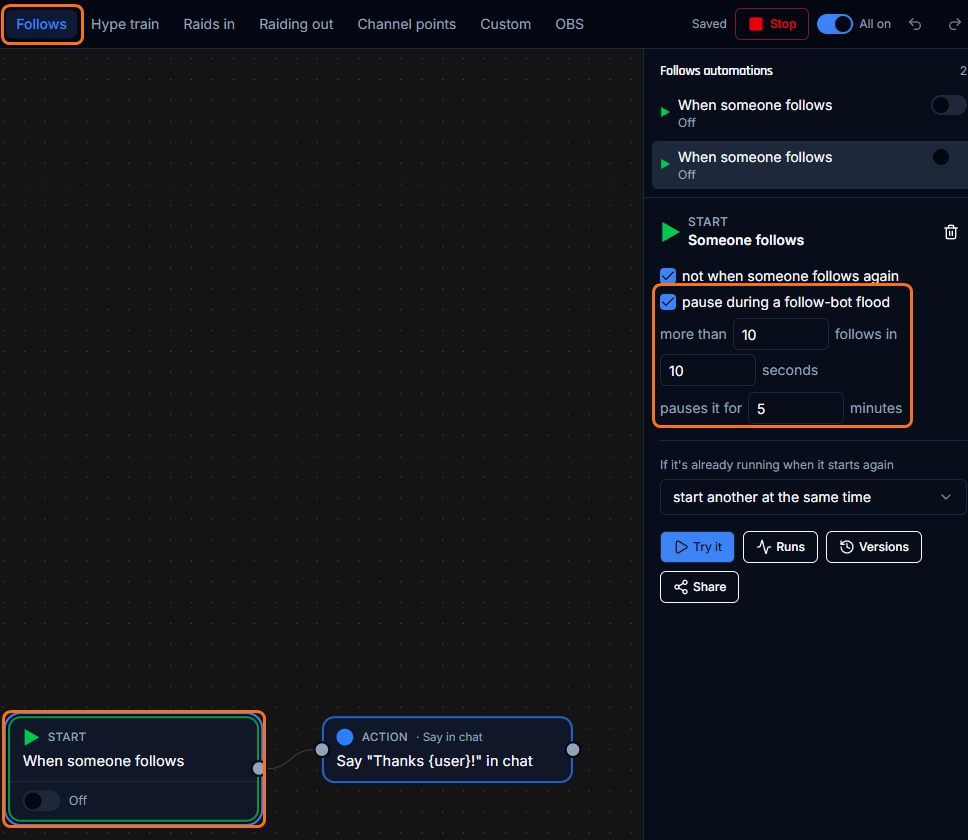
The follow-bot guard. Every follow automation has one, and it's on by default. More than 10 follows in 10 seconds pauses that automation for 5 minutes, so your stream doesn't play the same alert 300 times. To check it or change the numbers, open Automations, go to the Follows tab, and click the Start block.
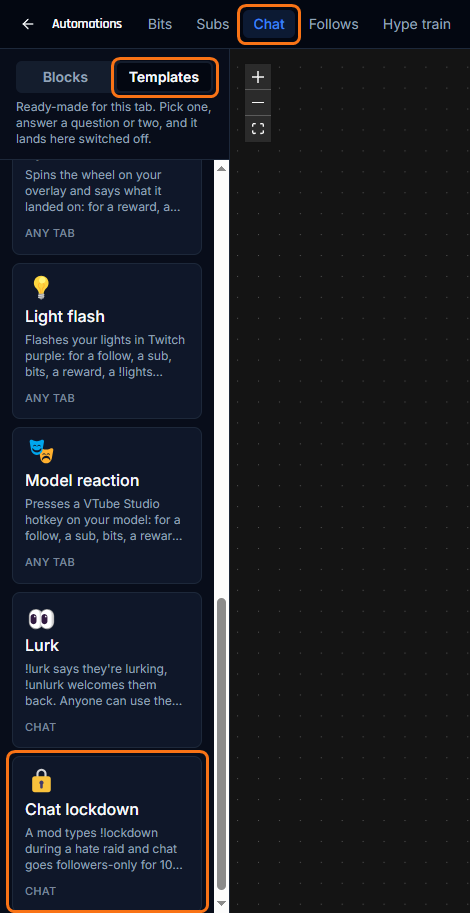
Chat lockdown. Any of your mods can type !lockdown, and chat goes followers-only for 10 minutes before going back to how it was (!unlock lifts it early). It's a template, so you add it once: Automations, the Chat tab, then Templates on the left. It lands switched off, so flip it on after you add it. STB has to be a mod in your channel for this one to work.
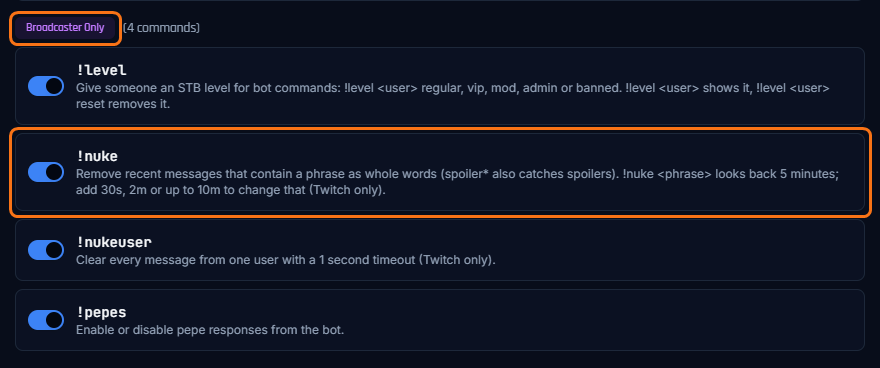
!nuke. Type !nuke followed by a phrase, and STB clears recent messages that contain it, from the last 5 minutes by default. It's handy when the same spam line keeps landing. Only you, the broadcaster, can use it, and it's already on.
Your numbers will move around, and that's the cleanup
Two things happen that both look like punishment and aren't.
Your viewer count can drop back down in the middle of the attack. Since August 2025 Twitch filters artificial viewers out of the number it shows, so the count climbing and then falling is the filter working.
Your follower count can dip weeks later. Fake accounts get removed in batches, so that drop arrives long after the attack and can feel like a second hit. It's the same cleanup, just later. Worth knowing now, because the follower dip catches people who'd already calmed down.
The View Count Cap, and who has it
Since 9 June 2026, Partners can turn on a View Count Cap. It holds the displayed number at your normal level while you're being botted, so the attack doesn't show up on your page. As of this writing it's Partners only. Twitch says a wider rollout is planned, and we checked again for this pass and it hadn't happened yet.
The one time "someone else did it" failed
There's a case from March 2025 people bring up: a streamer suspended days after bot software was visible on their own screen, on stream.
That wasn't a victim getting punished. The control panel was on their machine. It's the closest thing to a test of the "someone else did it" defense, and what it tested was whether saying the words is enough (it isn't). Being targeted and being caught are different situations, and Twitch could tell them apart here because the evidence was on camera.
What Twitch hasn't said
How they tell a victim from a buyer, since "we have methods" is the entire public description.
That matters in one way. If the distinction ever goes wrong for you, or you get capped or enforced against wrongly, the appeals portal is the route. Appeals go through the portal. Support DMs are the wrong door.
Kick and YouTube
Kick tells targeted channels to email support@kick.com and hasn't published anything promising that victims are protected. YouTube's fake engagement policy has no carve-out for victims at all: it describes what's not allowed and stops there.
Neither of those means you'll be punished. It means neither has put in writing that you won't be, and Twitch has.
Then get back to growing
An attack doesn't change what grows a channel. Your real regulars are still there, and the playbook is the same as it was yesterday: hang out in streams your size, raid out, clip your best moments, collab when you can (the first-viewers article has all of it). Expect your numbers to wobble while the cleanup runs, and keep streaming.
Where this comes from
The two quotes are Twitch's own, from the Community Guidelines and the botting help article, and the View Count Cap announcement is first-party and dated. The August 2025 filtering was announced on X and isn't written into a rules page.
Three parts are our reasoning. That the appeals portal covers a wrongful cap isn't on any page, and it combines the cap announcement's appeal language with the enforcement article's portal. Pausing your alerts is community practice from one guide. Twitch's own toolkit covers chat and says nothing about alerts. And reading a mid-attack count drop as the filter working follows from the filtering announcement, but Twitch has never described what happens during an attack.
What we looked for and couldn't find
We couldn't find a dedicated form or flow for reporting that you're being botted, or any description of how victims are told apart from buyers past "we have methods". Two passes turned up no documented case of a punished victim, no Kick or YouTube text protecting targeted channels, and no sign of the View Count Cap reaching anyone below Partner.
TL;DR: you're not in trouble. Don't engage, report, lock chat down if you need to, pause follow alerts, and expect your numbers to wobble while Twitch cleans up. Then go back to growing.
How well supported this is
Several independent sources agreed
Twitch states in writing, in two documents, that good-faith victims are not penalised (Community Guidelines and the botting help article, we hold dated snapshots of both)
fake follower batches are removed, causing later follower dips (help article, corroborated by the filtering announcement's viewcount language)
the lockdown toolkit for the chat side is official and consistent across Twitch's own pages and community guides
no documented case of a punished victim exists (searched across the original run and re-checked this run; still current as of 2026-08-24)
This rests on a single voice
the claim that victims do get banned is one community blog with no named case, and it contradicts the written policy
the self-cap's mechanics beyond the announcement (settings location) rest on one newsletter restating the post
the March 2025 failed-defence case is one outlet's report with the cause inferred from timing
Sources
the rules-document victim sentence: 'We understand that sometimes streamers are victims of account takeover, fraud, or viewbotting directed by a malicious third party. We have methods to detect the responsible party and do not penalize good-faith streamers under these circumstances.'; we hold a dated snapshot of this page
What it misses: 'we have methods' is the entire published description of how victim is told from buyer
the unqualified assurance ('Twitch will not punish a user for the actions of another'), the report/don't-panic/stay-civil advice, the batch removal of fake followers, and the note that screenshots are not conclusive evidence; we hold a dated snapshot of this page
What it misses: no dedicated reporting route beyond an ordinary user report; nothing about caps or filtering
the official lockdown toolkit: followers-only with follow-age, AutoMod up, email or phone verified chat, raid controls, clear chat, slow mode
What it misses: written for hate raids and chat spam; says nothing about view counts
every enforcement is emailed with an appeal path through the appeals portal, which is what a wrongly capped or enforced victim actually uses; we hold a snapshot of this page, which last changed 2026-08-18
the filtering announcement, including the victim-relevant halves: 'viewbotting can be out of the streamer's control' and botted channels 'will see an impact to your channel's viewcount'
What it misses: an X post, not a rules page
the 9 June 2026 self-cap announcement: an optional View Count Cap for creators who believe they are being targeted, Partners first, wider rollout promised; still Partners-only as of this run
What it misses: an X post; the feature appears in no rules or help document fetched
where the self-cap lives (Settings then Stream Manager) and the defensive purpose, restated from the announcement
What it misses: a newsletter restating the X post
Kick's only victim guidance: 'If you believe your channel is being targeted with bots then reach out to support@kick.com immediately.'; wording verified against the live page 2026-08-24
What it misses: no victim-protection sentence and no stated process
YouTube's fake engagement policy has no victim carve-out; fake numbers are removed and strikes are possible
What it misses: silence on malicious targeting cuts both ways; nothing says victims are punished either
the one tested 'someone else set it up' defence, March 2025: the bot panel was on the streamer's own screen and the channel was suspended days later
What it misses: cause inferred from timing; Twitch never stated it
the community version of the sequence (document, report with time and date, tell your real viewers) and bot-account tells
What it misses: undated, references a dead platform, and its category-switch trick is unverified folk advice
the practical alert-side steps the official page lacks: pause alerts, switch to an alert-free scene, purge bot follows, clear queued alerts before resuming
What it misses: claims streamers 'are getting banned' from botted-chat screenshots with no named case; that claim contradicts written policy and nothing corroborates it
the detection signals (chatter-to-viewer ratio, flat viewer line, peak near average), which are what an attacked channel temporarily looks like from outside
What it misses: vendor heuristics; a small channel with quiet lurkers can resemble them
We also read and rejected 1 source for this article, mostly for unsourced figures or for selling the thing they were assessing.
What we changed
a streamer being botted maliciously has no tool of their own; they can only report and wait
Partners can set an optional View Count Cap on their own channel to hold the displayed count at its normal level while being botted; wider rollout promised and not yet delivered as of 2026-08-24
Twitch announced the self-cap on 9 June 2026, Partners first
a botted channel's displayed count keeps whatever the bots add until Twitch takes account-level action
artificial viewers are filtered out of displayed counts, so an attacked channel's number can drop back down without any enforcement on the victim
Twitch's detection rollout announced 28 July 2025 was live by 21 August 2025
Want this while you stream?
A.N.N.A is the SuperTurkBot assistant. She reads everything on this page and answers questions in your own dashboard, about your own channel, with your numbers in front of her. See SuperTurkBot.